I’m in the process of mapping some data from the LEHD Origin-Destination Employment Statistics (LODES) helpfully provided by the US Census Bureau. LODES contains information on place of work, place of residence, and flows at the block level. The data are updated annually. As such they’re an invaluable resource for studying the commute patterns of demographic groups.
The analysis I’m working on is looking at changes over time in number of jobs at the census place level (currently 2009 - 2011). I identified the common locations for the region I’m looking at and created an identically structured data frame for each year so that I can easily calculate the difference. Each year of data is identified as wac.place.year where year varies. I ran into some problems visualizing temporal changes using a built in diverging color scheme that I solved through its manual definition.
Identifying all common places is as simple as calling:
The commonly-structured data frames and differences can be created with the following:
12345678910111213141516171819202122
# Create three new (empty) data frames with only common rows between all yearswac.place.2009.v2 <-data.frame("stplcname"= all.places)wac.place.2010.v2 <-data.frame("stplcname"= all.places)wac.place.2011.v2 <-data.frame("stplcname"= all.places)# Populate these data frames using merge (rows with missing info will just get NA)wac.place.2009.v2 <-merge(wac.place.2009.v2, wac.place.2009, all =TRUE)wac.place.2010.v2 <-merge(wac.place.2010.v2, wac.place.2010, all =TRUE)wac.place.2011.v2 <-merge(wac.place.2011.v2, wac.place.2011, all =TRUE)# Take the difference to generate absolute growth numbers# Columns 4:54 represent the data, 1:3 are the geographic identifierswac.2011.2010 <-cbind(wac.place.2011.v2[,4:54]- wac.place.2010.v2[,4:54], wac.place.2011.v2[,1:3])wac.2010.2009 <-cbind(wac.place.2010.v2[,4:54]- wac.place.2009.v2[,4:54], wac.place.2011.v2[,1:3])# Calculate percentage differenceswac.2011.2010.pct <-cbind((wac.place.2011.v2[,4:54]- wac.place.2010.v2[,4:54])/ wac.place.2010.v2[,4:54], wac.place.2011.v2[,1:3])wac.2010.2009.pct <-cbind((wac.place.2010.v2[,4:54]- wac.place.2009.v2[,4:54])/ wac.place.2009.v2[,4:54], wac.place.2011.v2[,1:3])
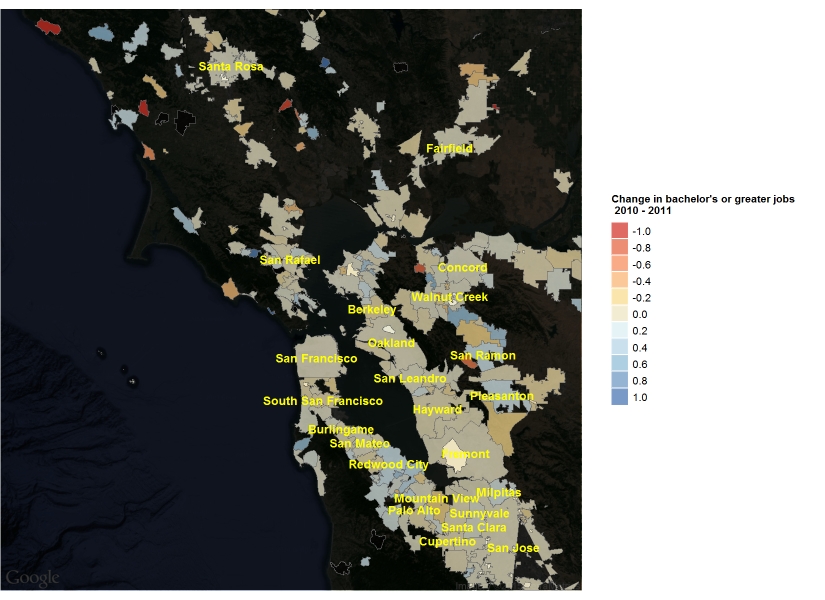
To visualize the percentage changes, I wanted to use a diverging color scheme, preferably derived from the Color Brewer palettes ranging between +/- 100%. My first attempts were not successful, because the default labeling for the palette associated red with the decreases and blue with the increases as in the following image. Note that, in the ggplot code, i indexes every employment category that I’m interested in, threshold separates the top 25 places in the Bay Area from the rest in terms of total employment, and pretty_name was a variable I created that stripped some census identifiers from places (CDP, city, town, etc.), and basemap is a map I created with ggmap. For a Color Brewer diverging palette, we can use scale_fill_distiller() in ggplot:
123456789101112
basemap + geom_polygon(data = places.box.f, aes(x = long, y = lat, group = group, fill =eval(parse(text =paste0(plot.categories[,1][i])))), color = grey(0.4), alpha =0.7, lwd =0.1)+ geom_text(data = label_points[label_points$C000 > threshold,], aes(x = long_, y = lat_, label = pretty_name), size =2, fontface =2, color ="yellow")+ scale_fill_distiller(name =paste0("Change in ", plot.categories[,2][i]," jobs\n 2010 - 2011"), type ="div", palette ="RdYlBu", space ="Lab", na.value ="black", limits =c(-1,1), breaks = pretty_breaks(n =10), guide ="legend")+ guides(fill = guide_legend(override.aes =list(colour =NULL)))+ theme_nothing(legend =TRUE)+ theme(legend.title = element_text(size =5), legend.text = element_text(size =5), legend.key.size = unit(8,"points"))+ coord_map()
From which we get this map:
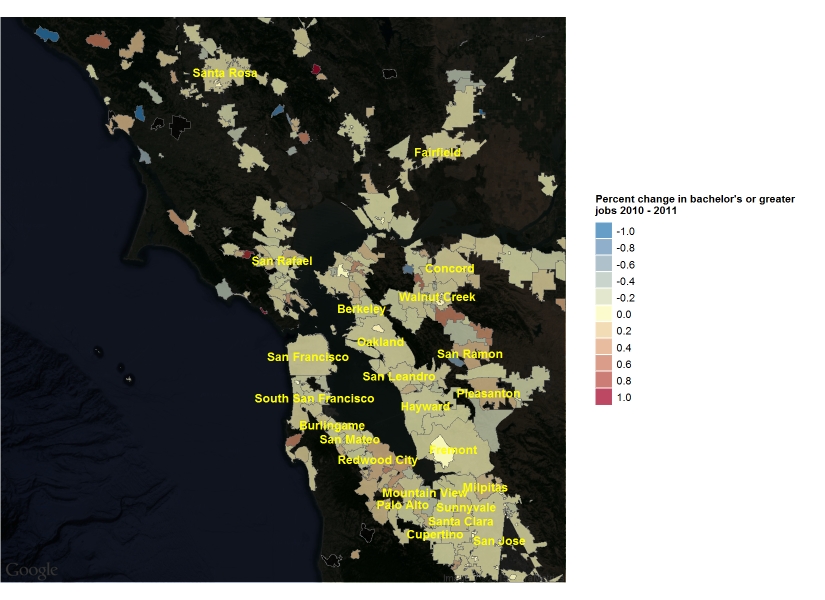
As mentioned, this has the scale flipped from what we’d expect. After substantial poking around, I was unable to find an easy way to flip the colors, leading me ultimately to scale_fill_gradient2() which allows you to manually define your own diverging palette. It’s not as pretty as Color Brewer’s (since I think ggplot just linearly interpolates colors between the max, mid, and min) but it gets the job done. This code:
123456789101112
basemap + geom_polygon(data = places.box.f, aes(x = long, y = lat, group = group, fill =eval(parse(text =paste0(plot.categories[,1][i])))), color = grey(0.4), alpha =0.7, lwd =0.1)+ geom_text(data = label_points[label_points$C000 > threshold,], aes(x = long_, y = lat_, label = pretty_name), size =2, fontface =2, color ="yellow")+ scale_fill_gradient2(name =paste0("Percent change in ", plot.categories[,2][i],"\njobs 2010 - 2011"), limits =c(-1,1), breaks = pretty_breaks(n =10), low ="#2C7BB6", mid ="#FFFFBF", high ="#A50026", midpoint =0, space ="Lab", na.value ="black", guide ="legend")+ guides(fill = guide_legend(override.aes =list(colour =NULL)))+ theme_nothing(legend =TRUE)+ theme(legend.title = element_text(size =5), legend.text = element_text(size =5), legend.key.size = unit(8,"points"))+ coord_map()